
To track SEO performance with Google Analytics, set up GA4 for accurate metrics on organic traffic, bounce rates, and conversions. Regularly analyze acquisition reports to identify user engagement and content effectiveness. Focus on your highest-performing pages to discover content opportunities and assess underperforming areas. Implement goal tracking to measure conversions from organic sources. By doing this, you’ll gain valuable insights into your SEO strategy, leading to informed optimizations for better results. You’ll uncover more strategies ahead.
Why Use Google Analytics for SEO Tracking?
Google Analytics is a powerful tool that can provide critical insights into your SEO performance, but it has its limitations. By focusing on core metrics such as organic traffic, bounce rates, and conversion rates, you can effectively gauge your SEO efforts each month. Understanding what Google Analytics can and can’t measure is essential for making informed decisions to enhance your online strategy.
What Google Analytics for SEO can (and can’t) measure
How effectively are you leveraging Google Analytics for your SEO tracking? Understanding what Google Analytics for SEO can and can’t measure is essential. It excels in tracking various SEO performance metrics like organic traffic, bounce rates, and conversion rates, giving you insights into user behavior and engagement. You can analyze which keywords and landing pages drive the most traffic, allowing you to refine your strategies. However, it doesn’t measure off-site factors, like backlink quality or social media engagement directly. Additionally, it can’t provide insights into search rankings or algorithm changes. By recognizing these limitations, you can better utilize SEO tracking with Google Analytics, focusing on actionable data to drive your SEO strategy forward effectively.
Core SEO performance metrics to watch monthly
Monitoring core SEO performance metrics monthly is essential for maintaining a competitive edge in the digital landscape. By leveraging website traffic analysis tools like Google Analytics, you can gain valuable insights into your site’s performance. Here are three key metrics to focus on:
- Organic Traffic: Track the number of visitors coming from search engines to evaluate your SEO efforts.
- Bounce Rate: Analyze the percentage of visitors who leave your site after viewing only one page, indicating content relevance and user engagement.
- Conversion Rate: Measure how effectively your traffic converts into leads or sales, helping you assess overall effectiveness.
Consulting with Google Analytics experts in Colorado can help you interpret these metrics and optimize your SEO strategy for better results.
Set Up GA4 Correctly for SEO Performance Metrics
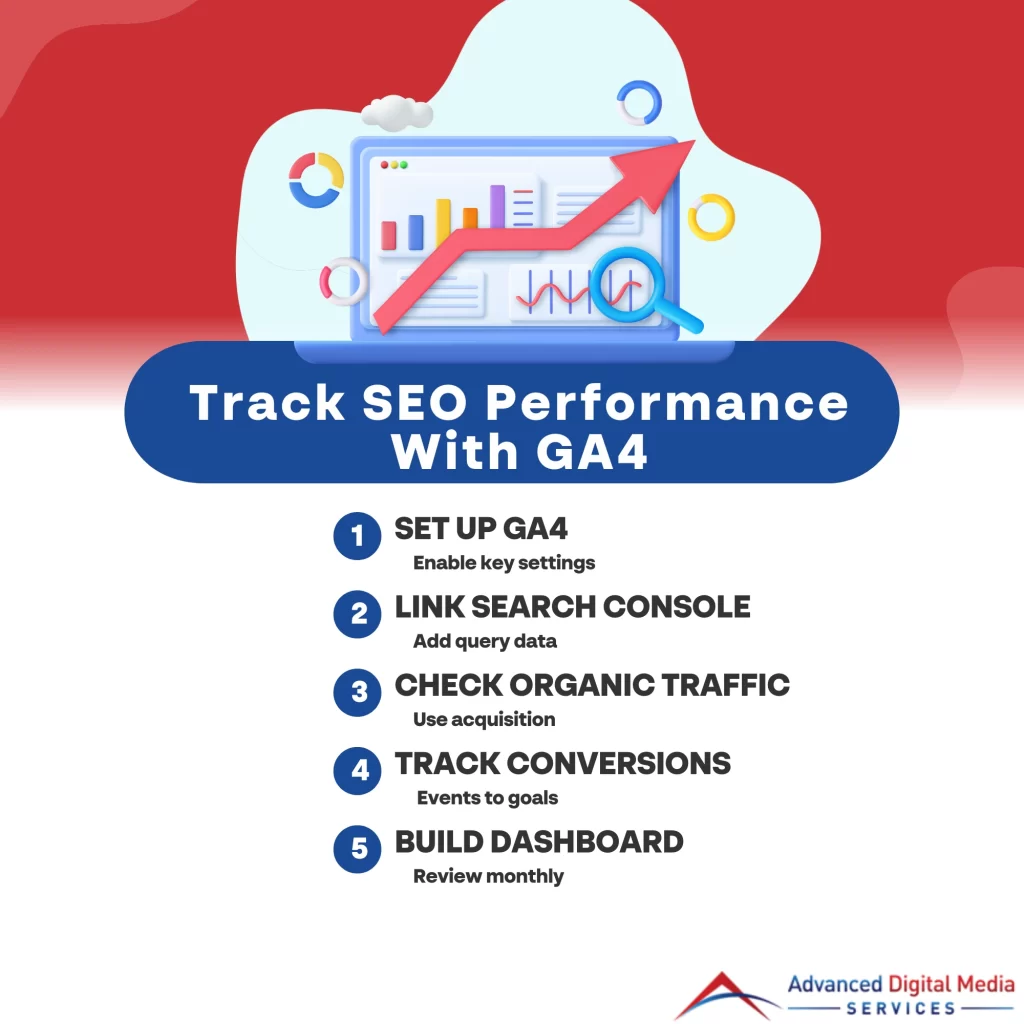
To effectively track SEO performance, it’s essential to set up Google Analytics 4 (GA4) correctly. Key settings, such as event tracking and user properties, can markedly influence your SEO reporting accuracy. Additionally, connecting Google Search Console allows for enhanced insights into organic search performance, providing a thorough view of your SEO efforts.
Key GA4 settings that impact SEO reporting
Setting up Google Analytics 4 (GA4) correctly is vital for accurately tracking SEO performance metrics. By configuring key settings, you’ll gain valuable insights into how your organic traffic performs. Here are three important settings to take into account:
- Data Streams: Verify you’ve set up web data streams to collect data from your website effectively. This helps in tracking user interactions accurately.
- Enhanced Measurement: Enable Enhanced Measurement to automatically track interactions like scrolls, outbound clicks, and video engagement, providing deeper insights into user behavior.
- Conversions: Define conversions specific to your SEO goals, such as form submissions or product purchases, allowing you to measure the effectiveness of your organic traffic more precisely.
Connecting Google Search Console for better SEO tracking
While connecting Google Search Console (GSC) to Google Analytics 4 (GA4) might seem like an additional step, it’s essential for gaining extensive insights into your SEO performance. By linking these two platforms, you can access invaluable data on organic search traffic, including query performance, click-through rates, and impressions. T his integration allows you to analyze how your pages rank for specific keywords and identify optimization opportunities. You’ll also be able to monitor site errors and usability issues directly from GA4, streamlining your SEO strategy. To connect GSC to GA4, navigate to the Admin section in GA4, select Property Settings, and link your GSC account. This setup enhances your analytics capabilities, providing a comprehensive view of your SEO efforts.
Measure Organic Traffic and Search Visibility
To effectively measure organic traffic and search visibility, you’ll want to leverage Google Analytics acquisition reports. These reports allow you to track the sources of your website traffic, pinpointing where your organic growth is coming from. Additionally, utilizing website traffic analysis tools can help you identify trends and patterns that inform your SEO strategy.
SEO tracking with Google Analytics using acquisition reports
Tracking SEO performance is essential for understanding how effectively your website attracts organic traffic and maintains search visibility. Google Analytics offers acquisition reports that provide valuable insights into this performance. Here’s how you can leverage these reports:
- Analyze Organic Traffic Sources**: Identify which search engines are driving the most traffic to your site, allowing you to focus on optimization strategies tailored to those platforms.
- Monitor User Behavior**: Evaluate metrics like bounce rate and session duration for organic visitors, giving you a clearer picture of content engagement.
- Assess Conversion Rates**: Understand how well organic traffic converts by tracking goal completions and e-commerce metrics, enabling you to refine your SEO tactics for better results.
Using these insights helps drive informed decisions for enhancing your SEO strategy.
Identifying organic growth trends with website traffic analysis tools
Measuring organic traffic and search visibility is essential for identifying growth trends that can inform your SEO strategy. By utilizing website traffic analysis tools like Google Analytics, you can track key metrics such as sessions, bounce rates, and page views. Focus on organic search traffic to determine how well your SEO efforts are performing. Look for patterns in data over time; for instance, spikes in traffic after content updates or keyword optimizations can indicate effective strategies. Additionally, evaluating user behavior through metrics like average session duration can reveal areas for improvement. By continuously monitoring these data points, you’ll be able to adapt your SEO tactics, ensuring sustained organic growth and enhanced search visibility in an evolving digital landscape.
Find Your Best SEO Pages and Content Opportunities
To identify your best SEO pages, you need to analyze landing page performance and understand what’s driving traffic and leads. By leveraging engagement metrics, you can pinpoint content gaps that may be hindering your site’s potential. This data-driven approach helps you focus on optimizing high-performing pages while exploring new content opportunities.
Landing page performance; what’s driving traffic and leads
While many businesses focus on broad SEO strategies, understanding which landing pages drive traffic and leads is essential for optimizing your online presence. Analyzing landing page performance gives you insight into what’s working and what needs improvement. Here are three key aspects to evaluate:
- Traffic Sources: Identify where your visitors are coming from—organic search, social media, or paid ads can all have different impacts.
- Conversion Rates: Measure how well each landing page converts visitors into leads, helping you pinpoint high-performing content.
- Bounce Rates: Analyze how quickly users leave your landing pages; high bounce rates might indicate content misalignment with user intent.
Using engagement metrics to spot content gaps
As you explore your SEO performance, leveraging engagement metrics can reveal valuable content gaps that may be hindering your online success. Start by analyzing key metrics like bounce rate, average session duration, and page views. A high bounce rate on specific pages indicates that users aren’t finding what they need, signaling a content gap. Conversely, pages with longer session duration might indicate engaging content worth expanding.
Utilize Google Analytics to identify underperforming pages and assess the topics that resonate with your audience. Look for common themes in your top-performing content, then create complementary pieces or enhance existing ones. By systematically addressing these gaps, you can optimize your content strategy, boost user engagement, and ultimately improve your site’s SEO performance.
Track Conversions and Leads from Organic Search
To effectively track conversions and leads from organic search, you need to set up specific events and conversions within your analytics platform. This allows you to accurately attribute calls, forms, and bookings to organic traffic sources, providing insight into what’s driving results. By analyzing this data, you can refine your SEO strategies and enhance your overall performance.
Setting up events and conversions for SEO
Tracking conversions and leads from organic search is essential for measuring the effectiveness of your SEO efforts. To set up events and conversions in Google Analytics, follow these steps:
- Define Your Goals: Clearly outline what actions you want users to take, such as form submissions or purchases. This provides a framework for tracking.
- Create Events: Use Google Tag Manager to set up events that capture specific interactions, like button clicks or video views. This allows you to monitor user engagement.
- Configure Conversions: In Google Analytics, mark these events as conversions. This way, you can see how many conversions stem from organic search traffic, giving you valuable insights into your SEO performance.
Attributing calls, forms, and bookings to organic traffic
Successfully measuring SEO performance goes beyond just monitoring events and conversions; it also involves attributing specific user actions—like calls, forms, and bookings—to organic traffic sources. To achieve this, you’ll need to set up goal tracking in Google Analytics. Start by defining your goals based on the desired actions, such as form submissions or phone calls. Utilize UTM parameters to label your links and track organic traffic effectively. By analyzing the data in the Conversions section, you can pinpoint which traffic sources lead to these actions. You’ll want to assess the behavior flow to identify patterns and refine your SEO strategies. This data-driven approach not only highlights the effectiveness of your organic efforts but also informs future marketing decisions.
Build Dashboards and Reports for Ongoing SEO Reviews
To effectively track your SEO performance, creating a simple monthly SEO reporting dashboard is essential. This dashboard should consolidate key metrics, making it easier to analyze trends and measure progress. Additionally, knowing when to collaborate with Google Analytics experts in Colorado can enhance your data interpretation and drive more informed decisions.
Creating a simple monthly SEO reporting dashboard
A well-structured monthly SEO reporting dashboard serves as an essential tool for measuring your website’s performance and identifying areas for improvement. By consolidating key metrics, you can make informed decisions to optimize your strategy. Here are three vital components to include in your dashboard:
- Organic Traffic Trends: Monitor changes in organic traffic over time to assess the effectiveness of your SEO efforts.
- Keyword Rankings: Track your target keywords’ positions to evaluate shifts and identify opportunities for content optimization.
- Conversion Rates: Analyze conversion metrics to determine how well your traffic is translating into actionable results, like leads or sales.
Get SEO Tracking Support from Advanced Digital Media Services
When you’re looking to refine your SEO strategy, partnering with Advanced Digital Media Services can make all the difference. Our expertise allows you to leverage data-driven insights that optimize your online presence. Here are three ways they can support your SEO tracking:
- Custom Analytics Setup: We’ll configure Google Analytics to track key performance indicators specific to your business goals, ensuring you capture the right data.
- Regular Performance Reports: You’ll receive detailed reports that analyze traffic trends, user behavior, and conversion rates, empowering you to make informed decisions.
- Ongoing Optimization Strategies: Based on analytics, Advanced Digital Media Services provides actionable recommendations and continuous adjustments to enhance your SEO efforts. Partnering with Advanced Digital Media Services enhances your SEO strategy through expert insights and tailored analytics.
Takeaways
To sum up, leveraging Google Analytics for tracking your SEO performance is like having a compass in the vast ocean of digital marketing. By understanding your data and metrics, you can navigate towards higher rankings and increased visibility. From measuring organic traffic to identifying opportunities for growth, these insights are invaluable. Remember, the more you analyze, the more you optimize. So dive deep into your data and let it guide your SEO strategy to new heights.
Frequently Asked Questions
How Often Should I Check My SEO Performance in Google Analytics?
You should check your SEO performance monthly for thorough insights, but weekly reviews can help you quickly identify trends and make necessary adjustments. Regular monitoring guarantees your strategies remain effective and aligned with your goals.
What Are the Key Metrics to Focus on for SEO?
You should focus on organic traffic, keyword rankings, bounce rates, conversion rates, and page load speed. These metrics provide critical insights into your SEO effectiveness, helping you make informed adjustments to enhance visibility and performance.
Can I Track Mobile Versus Desktop SEO Performance in GA4?
Yes, you can track mobile versus desktop SEO performance in GA4. Utilize the “Device Category” dimension to segment data, allowing you to analyze engagement metrics, conversion rates, and user behavior across different devices effectively.
How Do I Interpret Bounce Rate in Relation to SEO?
You can interpret bounce rate as an indicator of user engagement; a high rate may suggest irrelevant content or poor user experience. Analyze this alongside session duration and conversion metrics for deeper SEO insights.
What Are Common Mistakes to Avoid When Using GA for SEO?
When using Google Analytics for SEO, avoid ignoring data segmentation, overlooking site speed metrics, misinterpreting traffic sources, failing to set conversion goals, and neglecting user behavior insights. Each mistake can greatly distort your SEO effectiveness.